


EZArrival: K12 Transportation
4.85.00 Reviews
App Specs
- Version
- 1.1.1
- Updated On
- License
- Free
- Downloads
- 10,000+
- Developer
- Pathwise
- Categories
- Education
- Platform
- Android
Screenshots
 Analysis by AppCompare
Getting a child to school is only half the transportation problem. The other half is knowing what is happening before the morning rush begins, especially when a bus, pickup point, or school-day plan changes. EZArrival: K12 Transportation is an education app from Pathwise that focuses on helping families manage school transportation from a phone. I see it as a practical companion for parents who want one place to follow the transportation arrangements connected with their K-12 child, rather than relying on scattered messages or trying to remember every detail themselves.
My first impression is that the app is aimed at reducing uncertainty, not turning transportation into a complicated dashboard. Its store summary describes secure management of a child’s school transportation, and that focus matters. This is not presented as a general school portal, homework tool, or family calendar. Its value depends on whether your child’s school transportation is supported and whether your family will actually use the app as part of the daily routine.
The most useful way to judge EZArrival is by the moment it saves you from guessing. If you regularly ask whether your child is expected to ride, where the relevant transportation information is stored, or what you should check before leaving home, a dedicated transportation app can be more convenient than a chain of texts and paper notices. If your school does not connect its transportation process to the app, however, installing it alone will not solve that problem.
What to expect before relying on it
EZArrival belongs in the education category, but its role is narrower than that label might suggest. It is built around K-12 school transportation, so the experience should be approached as a family coordination tool rather than a learning platform. That distinction is important for first-time users: you are not opening it to find lessons, grades, or classroom discussions. You are opening it to handle transportation information associated with your child’s school day.
The app is free, which removes the most obvious barrier to trying it. It is rated for Everyone, and the current version is 1.1.1. It runs on Android 7.0 or later, making it accessible to many older Android phones as well as newer devices. That does not guarantee an identical experience on every phone, but it does make EZArrival more approachable for families who are not using the latest hardware.
Pathwise is the developer, and the app has built a strong early impression in the store, with a 4.9 average from around 222 ratings and over 10 thousand installs. I would treat those figures as encouraging rather than as a substitute for checking compatibility with your own school. Transportation systems are local by nature. An app can be well designed and still be of limited use if the district or transportation provider your child uses is not part of the workflow.
Before installing, I would ask one simple question: “Is this the app my school expects families to use?” That question is more important here than it would be for a typical independent education app. Look for the app name in a school message, transportation notice, or official family instructions. This small check can prevent the most frustrating first-time experience: creating an account in an app that your child’s school does not use for your route or transportation arrangement.
Worth Reading Before You Choose

EA SPORTS FC Mobile 26 Is a Bigger Football Game, but It Takes Time

Flipboard Shows What News Apps Must Do Beyond the Feed

Switching to Android Auto Means Rethinking Your Driving Routine

Google Calendar Makes a Crowded Week Easier to Manage

Ludo King Makes the Most of the Minutes Between Plans

Baby Panda World Brings Quick Play to Modern Phones, but Its Game Library Feels Busy
It is also worth deciding who in the household will manage the information. One parent may be responsible for morning drop-off, while another handles afternoon pickup. Agreeing on who will complete the initial setup and who will check the app on busy days avoids duplicated work and conflicting assumptions. The app can be most useful when it becomes part of a shared routine, not when every adult checks it independently without knowing what the others have done.
Setting up without turning it into another chore
For a first-time user, I would install EZArrival when I have a few quiet minutes rather than while children are putting on shoes. Start with the school-provided instructions, then follow the app’s account or access process carefully. Use the same family details that the school or transportation service has on record, because a mismatch can be mistaken for an app problem when it is really an account-linking issue.
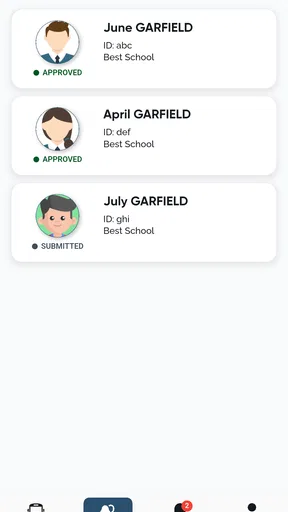
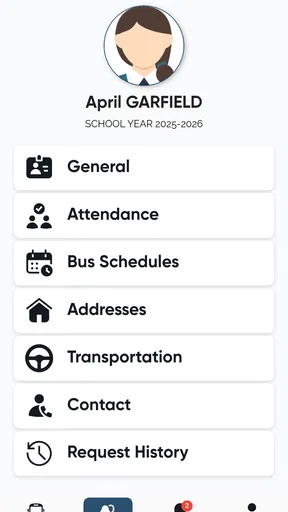
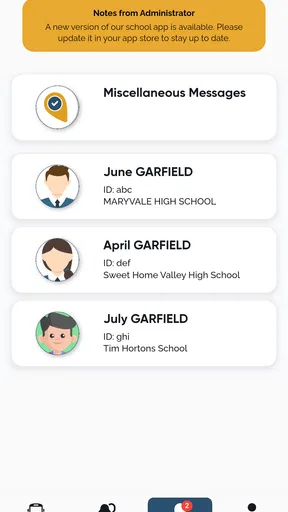
Once you are inside, take a deliberate look at the child or transportation information associated with the account. Do not rush straight to the first morning use. Confirm that the correct child is represented and that the transportation arrangement shown is the one your family expects. This is a small but important habit in any child-related app: the goal is not merely to sign in, but to make sure the information belongs to the right child before acting on it.
If more than one child in your household uses school transportation, slow down when switching between their information. Similar names, overlapping school schedules, and different transportation arrangements can make a quick tap surprisingly risky. I recommend reading the child’s name and the relevant day or arrangement each time you change profiles, especially during the first week. That extra second is more valuable than assuming the app has selected the person you intended.
Security is part of the app’s stated purpose, but good family habits still matter. Keep the account on your own device, use a screen lock, and avoid handing your unlocked phone to a child while transportation details are open. If another caregiver needs access, it is better to use the supported account process than to pass around one login casually. These are ordinary precautions, but transportation information is connected to a child’s daily movements, so convenience should not replace care.
The first setup should also include a practical test: open the app again after completing the account process and see whether the information is still easy to find. Many apps feel clear during setup but become less useful when a parent is checking them with one hand at a bus stop. If you can reach the relevant transportation view quickly, you have already learned something important about whether EZArrival fits your routine.
The first meaningful success
The first successful action is not simply downloading the app or reaching the home screen. It is using EZArrival to answer a real transportation question for your child without switching to another source. For example, before a school morning begins, open the app and verify the transportation information you need for that day. Then compare what you see with the plan your family has already discussed. This creates a useful baseline and helps you notice whether the app is genuinely reducing uncertainty.
A realistic scenario would be a parent preparing two children for school while also leaving for work. Instead of searching through old messages, the parent opens EZArrival, checks the relevant child’s transportation details, and confirms which plan applies before the children leave. The advantage is not dramatic automation; it is the reduction of one small but stressful search during a crowded part of the day.
Another useful scenario is handoff between caregivers. Suppose one adult takes a child to school in the morning and another is responsible later. The morning caregiver can check the transportation information and communicate the practical outcome rather than forwarding a long conversation from a school group chat. The app does not replace communication between adults, but it can give that conversation a clearer starting point.
I would also use the first successful check to establish a routine that does not become excessive. Checking once at a sensible point in the morning may be enough for your household. Reopening the app repeatedly can create more anxiety than clarity, especially if you are looking for changes that have not occurred. The best use is purposeful: check when you need to make a decision, then move on with the day.
Families should be patient during the first few uses. A transportation app is only helpful when the information is connected correctly and understood in context. If something looks unfamiliar, compare it with the school’s normal transportation communication before making a last-minute change. Do not assume that every unfamiliar screen means the child’s plan has changed, and do not ignore a genuine discrepancy simply because the app is new to you.
Where first-time users may hesitate
The biggest possible source of confusion is the difference between an app account and a school transportation record. Signing in successfully does not necessarily mean that every child or transportation arrangement has been connected correctly. If the account opens but the expected information is not visible, check the school’s instructions and the details used during setup before repeatedly reinstalling the app.
A second point of friction is knowing which information should be treated as the current plan. Transportation can involve recurring routines, special school days, caregiver changes, and exceptions. I would avoid assuming that a familiar arrangement applies automatically to every day. Read the information shown for the situation you are checking, and confirm unusual changes through the school’s established communication channel when necessary.
Another common mistake is treating EZArrival as a replacement for every school message. Its purpose is transportation management, not necessarily the full range of announcements a school may send. If a teacher, school office, or transportation contact communicates a special instruction, keep that context in mind rather than expecting the app alone to explain it. The app is strongest when it gives you a reliable transportation reference, while official school communication supplies broader context.
Parents may also wonder whether they can use it for children who do not take school transportation every day. The practical answer depends on how your school has arranged its transportation process and how your child’s information appears in the app. If your family alternates between bus travel, car pickup, walking, or another arrangement, treat each day as a deliberate check rather than assuming the app will infer your intentions. That is a useful trade-off: a dedicated record can be clearer than memory, but only if the family keeps the record aligned with real plans.
Privacy is another reason to be intentional. Because the app concerns a child’s school transportation, I would not use a shared public device or leave the account open where unrelated people can see it. The app’s focus on secure management is reassuring, but security is also shaped by how families handle phones, passwords, and account access. A careful setup makes the convenience more worthwhile.
How it compares with ordinary alternatives
The usual alternative is a mixture of school emails, text messages, printed notices, and memory. That approach can work for a simple routine, especially when the same adult handles transportation every day. Its weakness appears when plans change or responsibility moves between caregivers. Information becomes spread across several places, and the person making the decision may not have seen the original message.
A general family calendar is better for recording a planned reminder, but it usually depends on someone entering the details manually. That can be useful for repeating routines, yet it may not be the best source for transportation information connected with the school. EZArrival has a more focused purpose: it is designed around the child’s school transportation rather than asking parents to build their own system from scratch.
A school-wide portal may offer more types of information, such as attendance or announcements, but broader coverage can also mean more searching. EZArrival’s appeal is concentration. If all you need at a particular moment is transportation information, a focused app may be faster than navigating a large school platform. On the other hand, families who want one application for every school task may prefer the broader portal and use EZArrival only if the transportation workflow is noticeably clearer.
Paper schedules still have one advantage: they work without opening a phone. For a stable routine, a printed backup on the refrigerator can be perfectly sensible. I would not discard that backup immediately. Instead, use EZArrival for the current transportation check and keep a simple household reference for ordinary routines. This combination is especially helpful when a phone battery is low or a caregiver is still learning the app.
Who will benefit, and who may want another approach
EZArrival is a good fit for parents and guardians whose children use school transportation and whose school expects families to manage those arrangements digitally. It is particularly useful for households with changing schedules, multiple caregivers, or a need to verify transportation before leaving home. The free price also makes it easy to test without committing money to a new family system.
It may be less useful for a child who never uses school transportation, a family whose school relies entirely on another platform, or someone looking for a complete school-management app. It is also not the right answer for a parent who wants a manually customizable family planner above all else. A calendar may be better for coordinating sports, appointments, and carpool notes, while EZArrival is more appropriate when the school transportation connection is the central need.
Families with very young children should remember that the app supports the adult’s planning; it does not remove the need for adult supervision and communication. A parent still has to make sure the child understands the day’s plan and is ready for the appropriate pickup or drop-off arrangement. The app can make information easier to consult, but it cannot replace the judgment required when a child is absent, a caregiver is late, or an unusual school event changes the routine.
My practical routine after the first week
After setup, I would keep the routine simple. Check the app at the point when your family normally finalizes the day’s transportation, verify the correct child, and then communicate any important outcome to the other caregiver. Avoid creating a second, conflicting record unless you need one for backup. The purpose is to make transportation clearer, not to produce extra administration.
For households with more than one child, I would check each child separately and say the plan aloud before leaving. This may sound basic, but it catches the kind of mix-up that polished interfaces cannot prevent: the right account with the wrong child selected, or a familiar routine applied to the wrong person. My most useful tip is to make the child’s identity part of the check, not an assumption made after the check.
When a plan looks different from what you expected, pause before changing everything. First confirm the day, the child, and the transportation arrangement. Then use the school’s normal contact method if the difference still matters. This three-step habit prevents both overreacting to a misunderstood screen and overlooking a real transportation change.
EZArrival: K12 Transportation was released on March 17, 2026, and its current version is 1.1.1, so I would keep expectations realistic about how established the product feels in your particular school community. Its early store response is promising, but the real test is whether the information you need is available and dependable in your child’s daily context. A high rating cannot answer that local question for you.
My final view is positive, with a clear condition: EZArrival is worth trying when your school’s transportation process is connected to it and your family needs a focused way to check the plan. I like the narrow purpose because it avoids the clutter of a full school portal, and the free access makes the decision easy. I would not use it as the only source for every school instruction, and I would keep a simple backup routine while learning it. For the right family, the first real success is refreshingly modest: open the app, identify the correct child, confirm the transportation plan, and leave home with one less thing to guess.
Pros
- Provides parents with timely school bus arrival updates.
- Helps reduce uncertainty during morning pickup and afternoon drop-off.
- Simple interface focused on essential transportation information.
- Can improve communication between schools
- families
- and bus services.
- Useful for tracking transportation changes while away from home.
Cons
- Availability may depend on the school district’s transportation system.
- Requires an internet connection for current arrival information.
- Notifications may be delayed by traffic
- weather
- or technical issues.
- Features and tracking accuracy can vary between districts.
- Parents may need school-provided login credentials to use the app.
FAQs for EZArrival: K12 Transportation
What is EZArrival: K12 Transportation used for?
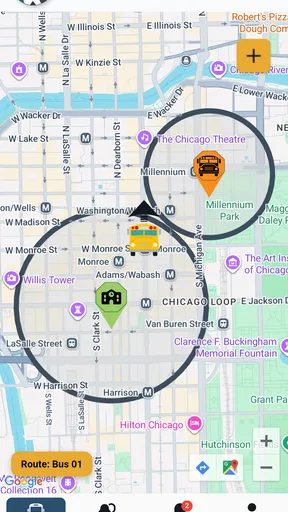
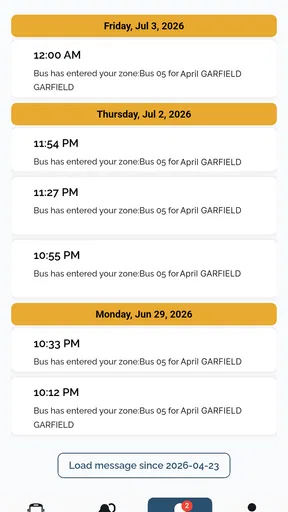
EZArrival: K12 Transportation is designed to help schools, families, and authorized transportation staff manage student travel information. Depending on the school district’s setup, parents or guardians may be able to view bus routes, receive arrival and departure updates, check transportation notifications, and monitor changes affecting their child’s daily trip. Available features can vary by district and school configuration.
How do I sign in to EZArrival: K12 Transportation?
Access usually depends on an account created or enabled by your child’s school district. You may need to use credentials provided by the school, a district portal, or an invitation connected to your student’s transportation record. If your login does not work, confirm that you are using the correct email or username and contact the school or transportation department, since the app itself may not be able to create or verify your account.
Can I track my child’s school bus in real time?
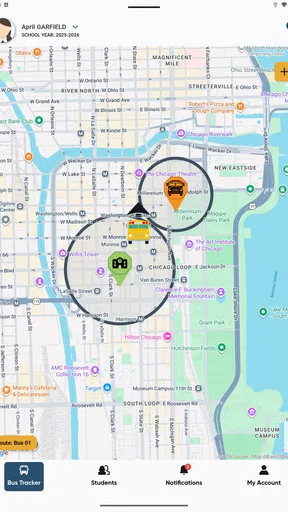
The app may provide bus location, estimated arrival information, or transportation status updates when those services are enabled by the participating school district. Real-time availability can depend on the vehicle’s GPS equipment, network coverage, route activity, and district policies. Therefore, the information should be treated as an estimate rather than a guarantee, especially during severe weather, traffic, or unexpected delays.
Why can’t I see my student’s route or transportation information?
If no route, student profile, or arrival information appears, the transportation record may not yet be active, your account may not be linked to the correct student, or your district may not have enabled every feature. Check that you selected the correct school year and account, then refresh the app. For unresolved problems, contact the school transportation office because they manage student assignments and route data.
Is EZArrival: K12 Transportation free and does it protect personal information?
The app may be available to download without a separate purchase, but access and functionality are generally provided through participating schools or districts. Because the service can handle student, guardian, route, and transportation details, users should review the app’s privacy policy and their district’s data practices before signing in. Keep your login private, use an updated device, and install updates from the official app store.


